
Key Takeaways:
Cloud computing gives businesses flexible access to computing, storage, databases, and other technology resources.
Public, private, and hybrid cloud models allow businesses to choose an environment based on their requirements.
Cloud infrastructure can accelerate software development, testing, deployment, AI adoption, and business growth.
Security, cost monitoring, migration planning, and technical expertise are essential for successful cloud adoption.
Cloud implementation costs can range from $5,000 to $80,000+, depending on infrastructure, complexity, integrations, and business requirements.
Cloud computing has become an important part of modern business infrastructure, allowing organizations to access computing power, storage, databases, software, and other technology resources over the internet. Instead of maintaining extensive physical infrastructure, businesses can use cloud platforms to support their daily operations and digital products.
From startups launching new applications to established organizations managing enterprise systems, cloud computing provides flexibility, scalability, and access to advanced technologies. It can also support software development, AI applications, data management, collaboration, and secure business operations.
Understanding how cloud computing works and where it can deliver value helps businesses choose the right cloud approach for their requirements, budget, and long-term technology strategy.
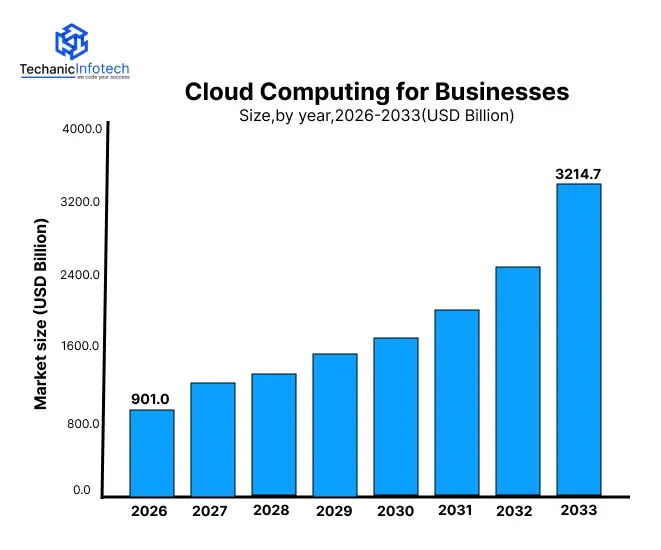
The global cloud services market was valued at USD 782.5 billion in 2025 and is projected to grow from USD 901.2 billion in 2026 to USD 3,214.7 billion in 2033, at a CAGR of 19.9% from 2026 to 2033.
According to CNCF's 2026 Annual Cloud Native Survey, 82% of container users run Kubernetes in production, showing the maturity of cloud-native infrastructure.
Cloud computing for businesses refers to the delivery of computing resources and technology services through the internet. Instead of purchasing and maintaining physical servers, companies can access infrastructure, storage, databases, software, and other resources from cloud providers based on their requirements.
This approach allows businesses to use technology resources without managing every part of the underlying hardware. Cloud environments can also be adjusted as business requirements change, making them suitable for organizations of different sizes and industries.
Cloud computing can also support custom software development by providing the infrastructure required to build, test, deploy, and operate business applications. Development teams can access cloud environments without setting up separate physical servers for every project.
Business cloud environments can include several technology components:
Computing resources: Virtual machines, containers, and processing power for running applications.
Cloud storage: Online storage for documents, images, backups, and application data.
Cloud databases: Managed databases for storing and accessing business information.
Networking: Virtual networks and connectivity services that allow applications and systems to communicate.
Security services: Identity management, encryption, monitoring, and other controls for protecting cloud resources.
Cloud-based software: Applications that employees can access through web browsers or connected devices.
For example, a retail business can use cloud computing to host its website, store product information, manage customer data, run analytics, and automatically increase computing resources during periods of high traffic.
Businesses across industries are adopting cloud computing to modernize their infrastructure, improve operational flexibility, and support digital growth. Cloud platforms allow organizations to access technology resources without making large investments in physical infrastructure.
Businesses can reduce their dependence on physical servers and data centres by using cloud-based infrastructure. This can simplify infrastructure management and allow internal teams to focus more on business operations and product development.
Cloud resources can be increased or reduced according to business requirements. This flexibility is useful for companies dealing with seasonal demand, changing workloads, or rapid growth.
Cloud environments provide development teams with ready-to-use computing, storage, databases, and deployment resources. This can help businesses accelerate software development services and move applications from development to production more efficiently.
Cloud platforms can support automated backups, disaster recovery, monitoring, and geographically distributed infrastructure. These capabilities can help businesses maintain access to important applications and data during technical disruptions.
Cloud-based applications and development environments allow employees and teams to access resources from different locations. This supports remote work, distributed development teams, and collaboration across multiple offices.
Cloud platforms also make it easier for businesses to adopt technologies such as artificial intelligence, machine learning, analytics, and automation without building all the required infrastructure internally.
Cloud computing can support different areas of business operations, from data storage and communication to application development and customer-facing services. The specific use depends on the organisation's size, industry, workload, and digital objectives.
Companies can host websites, mobile applications, customer portals, and internal business systems on cloud infrastructure. This provides access to scalable computing resources without maintaining dedicated physical servers.
Businesses can store documents, customer information, application data, and backups in cloud-based storage systems. Automated backup options can also help protect important information from hardware failures or accidental data loss.
Cloud-based productivity and communication tools allow employees to access business resources from different locations. Teams can collaborate on documents, projects, applications, and other work without depending on a single physical office.
E-commerce stores, booking platforms, banking applications, and other digital services can use cloud infrastructure to handle customer requests and changing traffic levels. This makes cloud computing particularly useful for businesses with unpredictable or rapidly growing demand.
Organizations can collect and process large volumes of business data in the cloud. Analytics tools can help teams identify trends, monitor performance, understand customers, and make more informed decisions.
Development teams can create separate cloud environments for building and testing applications. They can provision resources when required and remove them after testing, helping teams work more efficiently throughout the development lifecycle.
Cloud computing services are generally divided into different models based on the level of infrastructure and software management provided to the business. Choosing the appropriate model depends on the organization's technical requirements, resources, security needs, and development goals.
|
Cloud Service Model |
What It Provides |
Common Business Uses |
|
Infrastructure as a Service (IaaS) |
Virtual servers, storage, networking, and computing resources |
Application hosting, data processing, scalable infrastructure |
|
Platform as a Service (PaaS) |
Development tools, runtime environments, databases, and infrastructure |
Application development, testing, and deployment |
|
Software as a Service (SaaS) |
Ready-to-use software accessed through the internet |
CRM, accounting, communication, project management |
|
Function as a Service (FaaS) |
On-demand execution of individual functions without managing servers |
Event-driven applications, automation, APIs |
IaaS gives businesses greater control over their computing environment. Organizations can configure virtual machines, storage, networking, and other infrastructure according to their application requirements.
PaaS provides a managed environment where development teams can build, test, and deploy applications without managing the underlying infrastructure. It can simplify application development and reduce infrastructure administration.
SaaS delivers complete software applications through the internet. Businesses can use these solutions without installing and maintaining the underlying software infrastructure themselves.
FaaS allows developers to run individual pieces of application code when specific events occur. This can be useful for lightweight automation, APIs, background processing, and event-driven workflows.
Selecting the right cloud service model helps businesses balance control, scalability, development speed, maintenance requirements, and cost.
Cloud deployment models determine where cloud infrastructure is hosted, who can access it, and how resources are managed. Businesses can choose between public, private, and hybrid cloud environments based on their security requirements, workload, budget, and level of control.
|
Deployment Model |
Description |
Suitable For |
|
Public Cloud |
Infrastructure is provided by a third-party cloud provider and shared across customers. |
Startups, growing businesses, web and mobile applications |
|
Private Cloud |
Cloud infrastructure is dedicated to a single organization. |
Businesses with strict security, compliance, or control requirements |
|
Hybrid Cloud |
Combines private infrastructure with public cloud resources. |
Organizations that need both flexibility and greater control |
The right choice depends on factors such as data sensitivity, compliance requirements, workload patterns, budget, scalability needs, and internal technical capabilities.
Cloud computing has changed how development teams build, test, deploy, and maintain software applications. Instead of depending entirely on local infrastructure, teams can access development environments, databases, testing resources, and deployment tools through the cloud.
Cloud platforms allow developers to quickly create and configure development environments. Teams can provision the required resources without waiting for physical servers or lengthy infrastructure setup.
Developers, designers, testers, and project managers can work with shared cloud-based environments and resources. This is particularly useful for distributed teams working on the same application from different locations.
Cloud infrastructure can scale according to application requirements. This is valuable for enterprise software development, where applications may need to support large numbers of users, complex workloads, and multiple business operations.
Teams can create separate environments for functional, performance, security, and integration testing. Additional resources can be added when testing workloads increase and removed when they are no longer required.
Cloud-based deployment tools can help development teams release new versions and updates more efficiently. Automated workflows can reduce manual deployment tasks and improve consistency across environments.
Cloud platforms can integrate with containers, APIs, databases, monitoring tools, automation systems, and AI services. This allows development teams to build more flexible applications while adapting their technology stack as requirements change.
Overall, cloud computing provides a flexible foundation that can help software teams improve development speed, collaboration, testing, and application delivery.
Startups often need to validate an idea quickly while keeping infrastructure and development expenses under control. Cloud computing can provide the flexibility required to build, test, launch, and improve a product without making a large investment in physical infrastructure.
Cloud platforms provide ready-to-use servers, databases, storage, hosting, and development environments. This allows startup teams to focus on product functionality instead of spending significant time setting up infrastructure for MVP development.
Startups can use cloud resources based on their actual requirements rather than purchasing and maintaining dedicated hardware. This can make it easier to manage early-stage technology expenses.
If an MVP gains traction, cloud resources can be increased as the number of users, transactions, and data grows. Startups can therefore expand their infrastructure alongside product demand.
Cloud environments allow teams to test new features, collect user feedback, and release improvements without rebuilding the underlying infrastructure each time.
Startups working with distributed developers can provide team members with access to shared cloud environments, repositories, databases, and development tools.
For startups, the biggest advantage is flexibility. They can begin with a relatively simple cloud setup, validate the product with real users, and gradually increase infrastructure capabilities as the business grows.
Cloud computing and DevOps work together to help development teams automate infrastructure, testing, deployment, and application management. Cloud environments provide the flexibility and resources needed to implement modern development practices more efficiently.
Cloud platforms can connect development, testing, and deployment tools into a shared workflow. This reduces manual processes and helps teams move code between different stages more consistently.
Development teams can use infrastructure-as-code and automated provisioning to create or modify cloud resources through configuration files. This makes environments easier to reproduce and manage.
A CI/CD pipeline setup can automate the process of building, testing, and deploying applications. By connecting these stages, development teams can release updates more consistently while reducing repetitive manual deployment tasks.
Developers can automatically build and test code whenever changes are submitted. This helps identify issues earlier and reduces the risk of introducing errors into production applications.
When infrastructure provisioning, testing, monitoring, and deployment are automated, development teams can spend less time on repetitive operational tasks and more time improving the product.
Cloud-based tools can bring developers, testers, operations teams, and security professionals into a shared development workflow. Following DevOps principles can further improve collaboration, automation, and responsibility across the software lifecycle.
AI and machine learning applications often require significant computing power, data storage, and processing capabilities. Cloud computing provides businesses with scalable infrastructure that can support these requirements without requiring organizations to maintain specialised hardware themselves.
Cloud platforms allow businesses to access computing resources according to their AI workload. Resources can be increased for model training or large-scale data processing and reduced when demand decreases.
Development teams can use cloud-based databases, machine learning platforms, APIs, and development environments to build and test AI features more efficiently. Businesses can also work with specialised providers offering AI development services when they need additional expertise.
Cloud environments can bring data from different business systems into a centralised infrastructure. This can support analytics, machine learning, forecasting, recommendation systems, and other data-driven applications.
Businesses can integrate AI into customer service platforms, mobile applications, enterprise software, marketing systems, and internal tools. For example, an e-commerce platform can use AI to analyse customer behaviour and provide personalised product recommendations.
Cloud infrastructure can support ongoing data processing, model monitoring, and retraining workflows. This allows businesses to improve AI systems as new data becomes available and business requirements change.
By combining cloud scalability with AI capabilities, businesses can develop intelligent applications while maintaining the flexibility to adjust computing and data resources as their needs evolve.
Moving business workloads to the cloud can provide flexibility and scalability, but organizations must also implement appropriate security measures. Cloud security involves protecting data, applications, user accounts, infrastructure, and communication between different systems.
Businesses can encrypt sensitive information both when it is stored and when it moves between systems. Encryption helps reduce the risk of unauthorised access if data is intercepted or exposed.
Role-based permissions and multi-factor authentication can help ensure that employees only access the resources required for their responsibilities. Access permissions should also be reviewed regularly.
Cloud monitoring tools can identify unusual activity, failed login attempts, configuration changes, and other potential security issues. Continuous monitoring helps organizations respond to threats more quickly.
Regular backups can help businesses recover important data following accidental deletion, system failures, or security incidents. A documented disaster recovery strategy can further reduce operational disruption.
Security should be considered throughout the application lifecycle rather than only after deployment. Businesses developing dedicated security solutions can also explore cybersecurity software development to create applications for threat detection, monitoring, access management, and other security requirements.
Organizations should establish clear policies for data access, retention, encryption, authentication, and incident response. Depending on the industry and location, additional regulatory requirements may also apply.
Although cloud computing offers significant advantages, moving business applications and data to the cloud can also introduce technical, financial, and operational challenges. Identifying these issues early can help organizations plan a smoother cloud adoption strategy.
|
Challenge |
What It Can Affect | How Businesses Can Address It |
|
Cloud Cost Management |
Unexpected or increasing monthly expenses |
Monitor usage, set budgets, and remove unused resources |
|
Data Security |
Exposure of sensitive business information |
Use encryption, access controls, and continuous monitoring |
|
Migration Complexity |
Downtime and compatibility issues |
Plan migration in phases and test workloads before moving them |
|
Vendor Lock-In |
Difficulty switching cloud providers |
Use portable architectures and avoid unnecessary provider-specific dependencies |
|
Performance Issues |
Application speed and user experience |
Monitor workloads and optimise infrastructure regularly |
|
Skill Requirements |
Difficulty managing complex cloud environments |
Train internal teams or work with experienced cloud specialists |
|
Compliance Requirements |
Regulatory and data-handling risks |
Select appropriate infrastructure and maintain clear security policies |
Cloud resources can become expensive when businesses do not monitor usage effectively. Unused instances, excessive storage, and unnecessary services can increase monthly expenses.
Poor configurations or weak access controls can expose sensitive information. Businesses should establish security policies and regularly review permissions and infrastructure settings.
Moving existing applications and databases to the cloud can require significant planning. Legacy systems may need modifications before they can operate efficiently in a cloud environment.
Depending heavily on one provider's proprietary services can make future migration more difficult. Businesses should consider portability when designing their cloud architecture.
Cloud environments require knowledge of infrastructure, security, monitoring, automation, and cost management. Organizations may need to train existing employees or bring in specialised expertise.
The cost of implementing cloud computing for a business can range from $5,000 to $80,000+, depending on the size of the business, infrastructure requirements, application complexity, migration needs, security, integrations, and ongoing support.
A small business moving a simple application to the cloud may require a relatively limited investment, while a large organization migrating multiple enterprise systems can require significantly more planning, development, and infrastructure work.
|
Cloud Implementation Level |
Estimated Cost |
Typical Timeline |
|
Basic Cloud Setup |
$5,000–$12,000 |
2–4 weeks |
|
Small Business Cloud Solution |
$12,000–$25,000 |
4–8 weeks |
|
Medium Cloud Infrastructure |
$25,000–$40,000 |
2–3 months |
|
Advanced Cloud Implementation |
$40,000–$60,000 |
3–5 months |
|
Enterprise Cloud Solution |
$60,000–$80,000+ |
5–9+ months |
Several factors can affect the final investment, including the number of applications being migrated, data volume, infrastructure architecture, security requirements, third-party integrations, automation, compliance requirements, and the expertise of the development team.
Businesses should also consider ongoing expenses such as cloud resource usage, monitoring, security, backups, maintenance, and technical support when calculating the total cost of ownership.
Cloud computing has become a practical foundation for businesses looking to improve flexibility, scalability, security, and operational efficiency. From hosting applications and managing data to supporting software development, AI, and modern deployment practices, cloud technology can support businesses at different stages of digital growth.
The right approach is to select a cloud model and services based on actual business requirements rather than adopting technology without a clear strategy. With proper planning, security controls, cost management, and ongoing optimisation, businesses can use cloud computing to build stronger digital infrastructure and support long-term growth.
Cloud computing allows businesses to access computing resources, storage, databases, software, and other services through the internet.
The main types are IaaS, PaaS, SaaS, and FaaS, each providing different levels of infrastructure and software management.
Yes. Small businesses can use cloud services to access scalable technology without making large investments in physical infrastructure.
It provides flexible development environments, scalable infrastructure, testing resources, and deployment tools that can speed up software development.
Yes, when properly configured. Encryption, access controls, authentication, monitoring, and regular backups can help protect cloud environments.
Business cloud implementation can cost around $5,000 to $80,000+, depending on infrastructure, complexity, migration, security, and integration requirements.
A basic setup may take a few weeks, while complex enterprise cloud implementations can take several months.


Abhishek Jangid is the CEO of Techanic Infotech, with extensive experience in mobile app and web development. He specializes in helping businesses turn innovative ideas into scalable digital solutions through strategic planning and modern technology.