AI Development
AI Receptionist App Development: Features, Pricing and Revenue Models for Businesses
November 3, 2026
November 3, 2026
Key Takeaways
AI receptionist apps answer calls 24/7, capture leads, book appointments, and handle routine customer questions.
Development costs range from $8,000 to $90,000+, depending on features, integrations, and AI complexity.
Core features include voice AI, calendar booking, CRM integration, analytics, and human call transfers.
Start with an MVP, test real calls, and improve performance using customer feedback.
Generate revenue through subscriptions, usage-based fees, pay-per-minute pricing, white-label licensing, or enterprise plans.
How many customers do you lose when no one answers your business phone? A missed call can mean a lost appointment, a cold lead, or a customer who calls your competitor instead.
Hiring staff to cover every call can get expensive, too. An AI receptionist offers a practical way to handle routine calls, book appointments, and answer common questions around the clock.
With the right AI receptionist app development strategy, businesses can improve customer service without adding more work for their teams.
This guide covers the key features, development process, common mistakes, business models, and estimated cost to develop AI receptionist app.
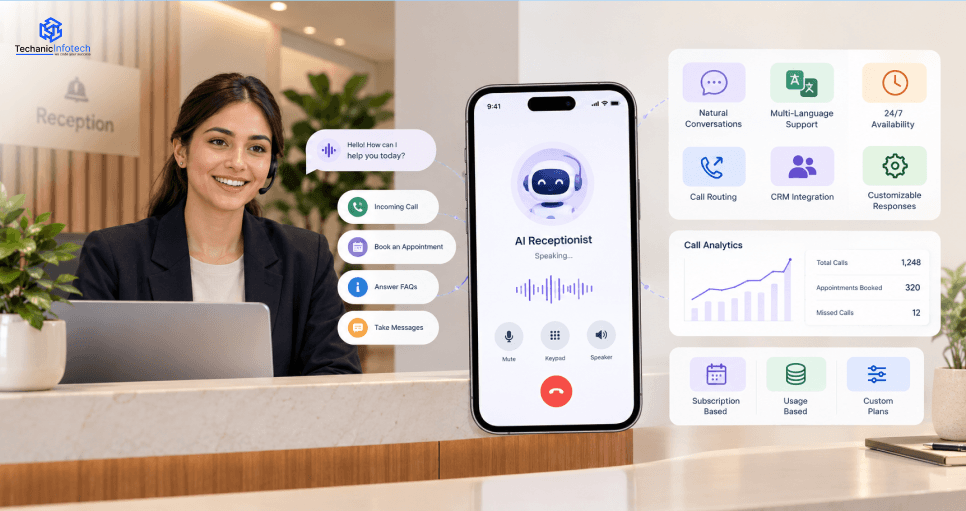
An AI receptionist app is software that uses artificial intelligence to answer business calls, respond to customer questions, schedule appointments, and manage routine front-desk tasks without constant human support.
Call handling: Answers incoming business calls using AI voice technology and natural language processing (NLP).
Speech recognition: Converts callers’ spoken words into text to understand their requests.
Intent detection: Identifies customer needs, such as booking appointments, checking business hours, or asking about services.
Automated responses: Uses conversational AI and a knowledge base to provide relevant, real-time answers.
Task automation: Connects with CRM systems, calendars, and scheduling software to update records and book appointments.
Human handoff: Transfers complex calls to a staff member when the AI cannot resolve an issue.
The AI receptionist app market is growing as businesses adopt automated call handling, appointment scheduling, and 24/7 customer support.
The global AI Receptionist Market was valued at USD 2.7 billion in 2025. It is projected to reach USD 31.3 billion by 2035, growing at a CAGR of 27.8% during 2026–2035.
According to Business Research Insights, the virtual receptionist service market is valued at USD 17.84 Billion in 2026 and is projected to reach USD 49.55 Billion by 2035, growing at a CAGR of 12.02%.
The global AI assistant market was valued at USD 16.29 billion in 2024 and is projected to reach USD 73.80 billion by 2033, growing at a CAGR of 18.8%. North America dominated the AI assistant market with a revenue share of 35.2% in 2024, while Asia Pacific is expected to grow at the fastest CAGR.
An AI receptionist app helps businesses answer calls faster, reduce staffing costs, improve customer service, and automate daily tasks without missing important customer inquiries.
An AI receptionist answers calls and common questions after business hours, so customers can get help at night, on weekends, and during holidays.
Automating routine calls, appointment bookings, and follow-ups can reduce front-desk workloads and help businesses manage staffing expenses more efficiently.
An AI receptionist captures caller details, qualifies leads, and routes inquiries to the right team, helping businesses follow up before potential customers lose interest.
Calendar integrations let AI receptionists book, reschedule, and confirm appointments while sending reminders to reduce missed meetings and no-shows.
AI-powered call handling supports growing call volumes without adding staff for every new inquiry. With AI integration in mobile apps, businesses can connect voice AI with CRM tools and customer management systems.
AI receptionist apps help businesses manage calls, answer questions, book appointments, and handle customer requests across different industries.
|
Use Case |
Explanation |
|
Healthcare Clinics |
Schedules patient visits, answers basic questions, and sends appointment reminders. |
|
Real Estate Agencies |
Captures buyer inquiries, schedules property tours, and routes leads to agents. |
|
Law Firms |
Handles client calls, books consultations, and collects basic case details. |
|
Salons and Spas |
Manages bookings, rescheduling, service questions, and cancellation requests. |
|
Hotels |
Answers guest questions, handles reservations, and shares check-in information. |
|
Home Service Businesses |
Books plumbing, HVAC, and electrical service calls and captures job details. |
|
E-commerce Businesses |
Answers order questions, shares store policies, and routes support requests. |
|
Dental Offices |
Schedules dental visits, confirms appointments, and answers common patient questions. |
|
Financial Services |
Routes client calls, schedules meetings, and shares approved general information. |
|
Small Businesses |
Answers calls after hours, captures leads, and handles routine customer inquiries. |
The best AI receptionist apps combine basic call handling with advanced voice AI, smart scheduling, CRM integration, and secure data management to improve customer service.
Answer incoming calls automatically with natural-sounding voice AI. Use speech recognition and natural language processing (NLP) to understand callers and respond clearly.
Let callers book, cancel, or reschedule appointments. Connect Google Calendar or other scheduling tools to check availability and send booking confirmations.
Store caller details, call history, and customer preferences. CRM integration helps teams track leads, manage follow-ups, and keep customer records organized.
Route calls based on customer needs, business hours, or department. Transfer complex requests to a live agent when the AI needs human support.
Use large language models (LLMs), business knowledge bases, and context-aware responses to handle more complex questions. Experienced teams offering AI development services can help tailor these capabilities to business needs.
Track call volume, missed calls, response times, and booking rates through an analytics dashboard. Add multilingual voice support, access controls, and data encryption to support a wider customer base.
Building an AI receptionist app takes clear planning, the right AI technology, secure integrations, and real-world testing to deliver reliable customer support.
Start by deciding who will use your AI receptionist app. A dental clinic needs appointment booking, while a real estate agency may need lead capture and property inquiry handling.
Define your core goals:
Identify your target industry and customer needs.
Choose the main tasks to automate, such as call answering or scheduling.
Decide whether to build an iOS app, Android app, web dashboard, or all three.
Research competing apps and their pricing.
List the basic features for your first version (MVP). Start with automatic call answering, speech recognition, appointment scheduling, and human call transfers. Add advanced features after you test customer demand.
Your technology stack may include:
Speech-to-text: Converts callers’ speech into text.
AI language models: Understand requests and generate relevant answers.
Text-to-speech: Turns AI responses into spoken words.
Backend and database: Manage users, call records, appointments, and settings.
Your choices will shape development time, performance, and ongoing costs.
Create a simple interface that lets business owners manage calls without technical skills. Focus on clear navigation and useful information rather than crowded screens.
Include screens for:
Call history and recordings, where legally permitted.
Appointment schedules and customer details.
AI voice settings and business hours.
Call analytics, alerts, and account controls.
Map the caller’s experience, too. The conversation should feel clear and helpful, not like a maze of automated menus.
Now build the core AI receptionist. Connect speech recognition, a language model, and text-to-speech so the app can listen, understand, and respond during calls.
Set up a business knowledge base with approved details, including services, prices, hours, and common questions. Add rules to prevent unsupported answers and route sensitive or complex requests to a human.
If you’re researching how to build an AI powered mobile app, this is a key stage: the AI must work smoothly with the mobile interface, backend, and voice calling system.
An AI receptionist becomes more useful when it can take action instead of just talking. Connect a telephony provider for incoming and outgoing calls, then link the app to business tools.
Common integrations include:
Calendar APIs: Book, cancel, and reschedule appointments.
CRM platforms: Save leads, contact details, and call outcomes.
SMS and email services: Send confirmations and reminders.
Business systems: Retrieve approved service details and customer records.
Test every integration carefully. A friendly voice means little if it books the wrong time slot.
Before launch, test the app with real call scenarios and different speaking styles. Check how it handles background noise, accents, interruptions, unclear requests, and unexpected questions.
Your testing checklist should cover:
Response accuracy and voice latency.
Correct appointment bookings and call transfers.
Data encryption, account access, and secure API connections.
Call recording consent and applicable privacy rules.
Human fallback when the AI fails or cannot understand a caller.
Fix major issues before inviting paying customers.
Release the app to a small group of businesses first. Their feedback can reveal problems that internal testing may miss. Monitor call completion, booking success, transfer rates, response times, and customer satisfaction.
After launch:
Review analytics to find common call failures.
Improve the knowledge base and conversation prompts.
Fix bugs and update integrations.
Add advanced features based on customer feedback.
Scale your infrastructure as call volume grows.
An experienced AI development company can help with architecture, voice AI integration, security testing, and ongoing maintenance if your team lacks the required skills.
Choose technologies that support real-time voice calls, accurate AI responses, secure customer data, and smooth business integrations.
|
Technology Layer |
Recommended Technologies |
|
Mobile App Development |
React Native, Flutter, Swift, Kotlin |
|
Frontend Web Dashboard |
React.js, Next.js |
|
Backend Development |
Node.js, Python, FastAPI |
|
AI and Language Models |
OpenAI API, Anthropic Claude |
|
Speech-to-Text (STT) |
Deepgram, Google Speech-to-Text |
|
Text-to-Speech (TTS) |
ElevenLabs, Google Cloud Text-to-Speech |
|
Telephony and Voice Calls |
Twilio, Vonage |
|
Database |
PostgreSQL, MongoDB |
|
Real-Time Communication |
WebSockets, WebRTC |
|
Cloud Hosting |
AWS, Google Cloud, Microsoft Azure |
|
Authentication and Security |
OAuth 2.0, Auth0, AWS KMS |
|
Calendar and CRM Integration |
Google Calendar API, Salesforce API, HubSpot API |
|
Analytics and Monitoring |
Firebase Analytics, Sentry, Amazon CloudWatch |
|
Payments and Subscriptions |
Stripe |
The cost to build a conversational AI chatbot or AI receptionist app ranges from $8,000 to $90,000+, depending on features, integrations, AI complexity, and development time.
|
Development Scope |
Estimated Cost (USD) |
Timeline |
|
Basic AI Receptionist MVP |
$8,000–$15,000 |
4–6 weeks |
|
Standard App with Voice AI |
$15,000–$35,000 |
6–10 weeks |
|
Advanced App with CRM and Calendar Integration |
$35,000–$60,000 |
10–16 weeks |
|
Enterprise-Level AI Receptionist |
$60,000–$90,000+ |
4–6+ months |
Poor planning, weak voice recognition, and missing integrations can hurt an AI receptionist app. Avoid these mistakes to build a reliable product.
Mistake: Building features without understanding customer needs can lead to confusing calls, missed bookings, and low user adoption.
Solution: Research your target users and their call patterns. Prioritize appointment booking, FAQs, and call transfers based on real business needs.
Mistake: A weak AI model may misunderstand accents, give incorrect answers, or struggle with natural conversations during busy hours.
Solution: Test speech recognition, natural language processing, and response quality. Explore the top AI features for mobile apps to choose tools that fit your product.
Mistake: Without CRM and calendar connections, the app may miss customer details, create double bookings, or leave records outdated.
Solution: Connect trusted tools such as Salesforce, HubSpot, and Google Calendar. Test data syncing and appointment updates before launch.
Mistake: Poor security can expose caller details, call recordings, and personal information, creating legal risks and damaging customer trust.
Solution: Use encryption, access controls, and secure data storage. Review call-recording consent rules and relevant privacy laws before deployment.
Mistake: An AI receptionist that cannot transfer complex calls may frustrate customers who need urgent help or answers beyond its knowledge.
Solution: Add live-agent transfers, fallback responses, and escalation rules. Test handoffs for billing issues, complaints, and urgent requests.
Mistake: Launching without proper testing can cause delayed replies, failed bookings, poor call quality, and unexpected downtime.
Solution: Test real calls, different accents, and peak traffic. Work with an experienced AI receptionist app development company for monitoring and regular updates.
An AI receptionist app can earn revenue through monthly subscriptions, usage-based fees, and custom business plans for different customer needs.
Charge businesses a monthly or annual fee based on features, call limits, and the number of users.
Bill customers for AI voice calls by the minute. This works well for businesses with changing call volumes.
Offer Basic, Pro, and Enterprise plans with different call limits, CRM integrations, analytics, and support options.
Charge based on call minutes, AI requests, or appointment bookings. Customers pay for the services they actually use.
Let agencies and software providers rebrand your AI receptionist platform and sell it under their own business names.
Offer tailored pricing for large companies that need advanced security, custom integrations, dedicated support, and high call capacity.
Building an AI receptionist app can help businesses answer calls, book appointments, capture leads, and support customers around the clock.
The right AI receptionist app development strategy starts with clear business goals, essential features, and a realistic budget.
Start with a simple MVP, test it with real users, and improve the voice AI based on feedback. Strong security, reliable integrations, and a clear revenue model also matter.
With the right plan, businesses can turn everyday phone calls into better customer experiences and new growth opportunities.
An AI receptionist app uses voice AI to answer business calls, respond to common questions, book appointments, and route calls to staff.
AI receptionist app development can cost $8,000 to $90,000 or more, depending on features, AI complexity, integrations, and development time.
A basic AI receptionist MVP may take 4–6 weeks, while an advanced app can take 4–6 months or longer.
Key features include AI call answering, speech recognition, appointment booking, CRM integration, smart call routing, analytics, and human handoff.
Common technologies include Python, Node.js, OpenAI API, speech-to-text tools, text-to-speech systems, Twilio, and cloud platforms.
Healthcare clinics, real estate agencies, law firms, salons, hotels, dental offices, and home service businesses can use AI receptionists.
It can earn revenue through monthly subscriptions, pay-per-minute charges, usage-based pricing, tiered plans, white-label licensing, and enterprise contracts.
Businesses should use data encryption, access controls, secure integrations, and proper call-recording consent practices to protect customer information.


Bharat Sharma is the CTO of Techanic Infotech, bringing deep technical expertise in software architecture, mobile app development, and scalable system design. He leads the engineering team with a strong focus on innovation, performance, and security.