If you’re planning to build a mobile app, one of the first questions that probably comes to mind is, “How long will this take?” It’s a fair question and an important one.
Having a clear mobile app development timeline helps you plan your budget, set realistic goals, and avoid unnecessary delays.
The truth is, there’s no one-size-fits-all answer. The app development timeline depends on
things like app features, design complexity, platform choice, and testing needs. A simple app can be built quickly, while more advanced apps take time to get right.
In this blog, we’ll walk you through the mobile app development process step by step, explain how long each stage usually takes, and help you understand what really affects the time to develop a mobile app.
A mobile app development timeline is a clear roadmap that shows how much time each stage of app creation usually takes, from the first idea to the final launch.
Instead of guessing timelines or rushing into development, a timeline helps businesses understand what happens when and how long it will take. This makes planning smoother and reduces unexpected delays.
A complete mobile app development timeline covers every phase involved in building an app. It usually starts with idea validation and requirement analysis, where goals, features, and technical needs are defined. This is followed by the UI/UX design phase, which focuses on how
the app will look and feel.
Next comes front-end and back-end development, where the app is actually built. This stage often takes the longest, especially for apps with complex features or integrations. After development, testing and quality assurance ensure the app works smoothly across devices and operating systems. Finally, the timeline includes app deployment, store approvals, and launch preparation.
By breaking the project into clear phases, the timeline gives teams a realistic view of progress instead of treating mobile app development as a single block of work.
Understanding the mobile app development timeline early helps avoid rushed decisions, scope creep, and budget overruns. When timelines are unclear, projects often face last-minute feature additions, extended testing periods, or unexpected delays.
A well-defined timeline allows better resource planning, clearer communication between teams, and faster issue resolution. It also helps businesses set realistic expectations for stakeholders and launch plans.
Most importantly, early timeline planning reduces rework. When teams know what to build and when, they avoid repeating tasks or fixing avoidable mistakes later. In short, understanding the timeline upfront saves both time and money while keeping the project on track.
No two mobile apps are built the same, which is why development timelines can differ widely from one project to another. Even apps that look similar on the surface may have very different requirements behind the scenes.
Below are the main factors that cause mobile app development timelines to vary.
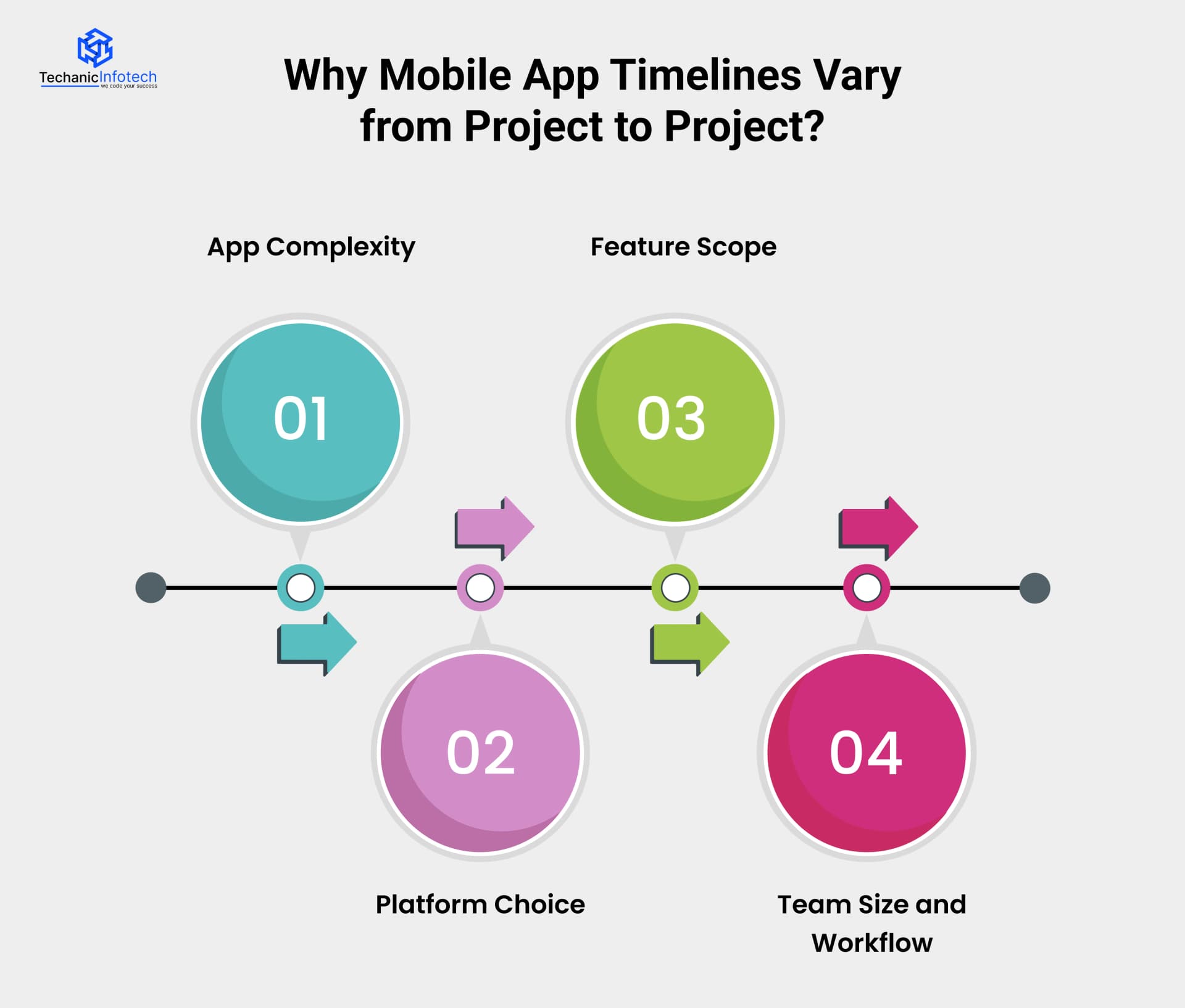
App complexity is one of the biggest factors affecting development time. A simple app with basic mobile app features like login, content display, and simple forms can be built much faster.
On the other hand, apps with real-time features, advanced security, payment systems, or large user roles require more development and testing time. The more complex the app logic and workflows, the longer it takes to build and stabilize.
The choice of platform also plays a major role in the timeline. Building an app for a single platform, such as Android or iOS, usually takes less time than developing for both.
Native apps require separate codebases, which increases development and testing time. Cross-platform development can reduce timelines in some cases, but it may still require additional effort depending on app features and performance needs.
The number and type of features directly impact how long development takes. Apps with minimal features are quicker to build, while feature-rich apps need more time for development, integration, and testing.
Frequent feature changes or additions during development can also extend timelines, especially if they affect core functionality.
The size and experience of the development team influence how efficiently work is completed.
A well-coordinated team following an agile workflow can deliver faster by working on multiple tasks in parallel. In contrast, smaller teams or unclear workflows may slow progress due to bottlenecks, communication gaps, or rework.
Understanding these factors helps businesses set realistic expectations and plan a mobile app development timeline that aligns with their goals and resources.
A mobile app development timeline is best understood when you look at how time is distributed across each stage. Instead of seeing development as one long process, breaking it down helps you plan realistically and avoid delays.
Below is a timeline-focused explanation of each stage, showing how time moves from idea to launch.

This is the foundation stage. Time is spent understanding the app idea, target users, core features, and technical feasibility.
Clear requirements are documented, and the project scope is finalized. Investing enough time here prevents confusion and rework later, which can otherwise add weeks or months to the timeline.
Once requirements are locked, the mobile app design phase begins. Designers create wireframes, user flows, and final visual designs. Feedback cycles are a key part of this timeline.
Apps with simple layouts move faster, while apps requiring custom animations, branding, or complex flows take longer. Rushing this stage often leads to usability fixes later, which slows development.
Front-end development focuses on building the screens and interactions users see. Developers convert designs into working interfaces.
The timeline here depends on the number of screens, animations, and platform choice. More interactive apps naturally require more front-end development time.
Back-end development runs alongside or slightly after front-end work. This stage involves building servers, databases, user management, and business logic.
Apps with real-time data, payments, or complex workflows require additional backend time to ensure stability and security.
Most apps rely on external services like payment gateways, maps, notifications, or analytics tools.
Integrating and testing these APIs adds time, especially when multiple services or custom integrations are involved. Delays often happen here if third-party dependencies are not planned early.
Mobile app testing ensures the app works smoothly across devices, operating systems, and real-world conditions.
Bugs are fixed, features are retested, and performance is optimized. Apps with broader device support or complex features require longer testing timelines.
The final stage includes preparing the app for release, submitting it to app stores, and handling approvals. Minor fixes and final checks are done to ensure a smooth launch.
Overall Timeline Insight
Most mobile apps take 12–20 weeks to move from idea to launch, depending on complexity and planning quality.

One of the easiest ways to estimate a mobile app development timeline is by looking at the app’s complexity. Different types of apps require different levels of planning, development, testing, and integration.
Below is a clear breakdown of how long it usually takes to build simple, mid-level, and complex or enterprise apps, along with realistic month-wise ranges.
Simple apps are designed with basic functionality and limited user interactions. These apps usually focus on a single purpose and do not require heavy backend logic or third-party integrations.
Typical examples include informational apps, basic booking apps, or simple content-based applications.
Timeline breakdown:
Planning & design: 2–3 weeks
Development: 4–6 weeks
Testing & launch: 2–3 weeks
Simple apps move faster because the feature set is limited and testing requirements are minimal.
Mid-level apps are more interactive and include multiple features and user roles. These apps often require integrations, data management, and better performance optimization.
Examples include eCommerce apps, on-demand service apps, or apps with user authentication and payments.
Timeline breakdown:
Planning & design: 3–4 weeks
Development: 8–12 weeks
Testing & launch: 4–6 weeks
The timeline increases because each feature requires proper integration and testing across devices.
Complex apps are built for scalability, high traffic, and advanced business operations. These apps often involve multiple user roles, real-time data, custom integrations, and strict security requirements.
Examples include enterprise platforms, top eWallet apps, healthcare apps, or apps with AI-based features.
Timeline breakdown:
Planning & design: 4–6 weeks
Development: 16–24 weeks
Testing & launch: 6–8 weeks
Enterprise apps require extensive testing, performance optimization, and compliance checks, which extend the timeline.
|
App Type |
Estimated Timeline |
Key Characteristics |
|
Simple Apps |
2–3 months |
Basic features, limited integrations |
|
Mid-Level Apps |
3–6 months |
Payments, APIs, multiple user roles |
|
Complex/Enterprise Apps |
6–9+ months |
High scalability, security, real-time features |
The platform you choose plays a big role in how long your mobile app takes to build. Android and iOS apps differ in development approach, testing needs, and approval processes.
Below is a clear, timeline-focused comparison to help you understand where time differences come from and when timelines usually increase.
|
Factor |
Android App Development |
iOS App Development |
|
Development Time |
Usually slightly longer due to device diversity |
Slightly faster due to limited devices |
|
Device & OS Variations |
High (many brands, screen sizes, OS versions) |
Low (Apple-controlled ecosystem) |
|
UI Guidelines |
Flexible but requires more adaptation |
Strict guidelines, consistent UI |
|
Testing Time |
Higher due to multiple devices and versions |
Lower due to fewer device variations |
|
App Store Approval |
Faster, fewer restrictions |
Takes longer due to strict review process |
|
Overall Timeline |
3–6+ months depending on complexity |
3–5+ months depending on complexity |
Timelines usually increase when apps are built for both Android and iOS separately using native development.
Each platform requires its own codebase, testing cycle, and mobile app maintenance effort. Timelines also extend when apps include platform-specific features, heavy animations, or deep system-level integrations.
|
Approach |
Timeline Impact |
Best For |
|
Native Development |
Longer overall timeline (separate builds) |
High performance, platform-specific features |
|
Cross-Platform Development |
Shorter timeline (shared codebase) |
Faster launch, reduced development time |
Cross-platform development can reduce timelines by 25–40% for many projects, especially when speed-to-market is a priority.
Choosing the right platform approach early helps control both development time and overall mobile app development cost.
The development methodology you choose has a direct impact on how fast your mobile app is built and how flexible the timeline remains during the project. The two most common approaches are Agile development and traditional (waterfall) development.
Each follows a different planning style and affects the app development timeline in unique ways.
Agile development works in short cycles called sprints, usually lasting 1–2 weeks. In each sprint, a small set of features is designed, developed, and tested. This approach allows teams to start development quickly and adjust timelines as the project evolves.
Traditional development follows a fixed plan where all requirements are defined upfront. Each phase, design, development, and testing, starts only after the previous one is completed. While this provides clear structure, it leaves little room for changes once development begins.
Agile allows faster and more frequent releases. Since the app is built in small parts, teams can launch an MVP or early version sooner and improve it over time. This shortens the time to market and reduces the risk of major delays.
Traditional development sticks to a rigid schedule. Any change in scope or feature list can push the entire timeline forward, making delays more likely.
|
Factor |
Agile Development |
Traditional Development |
|
Planning Style |
Flexible, sprint-based |
Fixed, upfront planning |
|
Development Flow |
Iterative and incremental |
Linear and sequential |
|
Timeline Flexibility |
High |
Low |
|
Time to First Release |
Faster (early MVP possible) |
Slower (full build required) |
|
Handling Changes |
Easy to adapt |
Difficult and time-consuming |
|
Risk of Delays |
Lower |
Higher |
Agile is usually better for projects where speed, flexibility, and user feedback are important. Traditional development may work for very stable projects with fixed requirements, but it often results in longer timelines.
Choosing the right methodology early helps keep your mobile app development timeline realistic and manageable.
Even well-planned app projects can face delays. Most timeline issues don’t come from development itself but from avoidable gaps in planning and execution.
Below are the most common areas where app development timelines slow down.
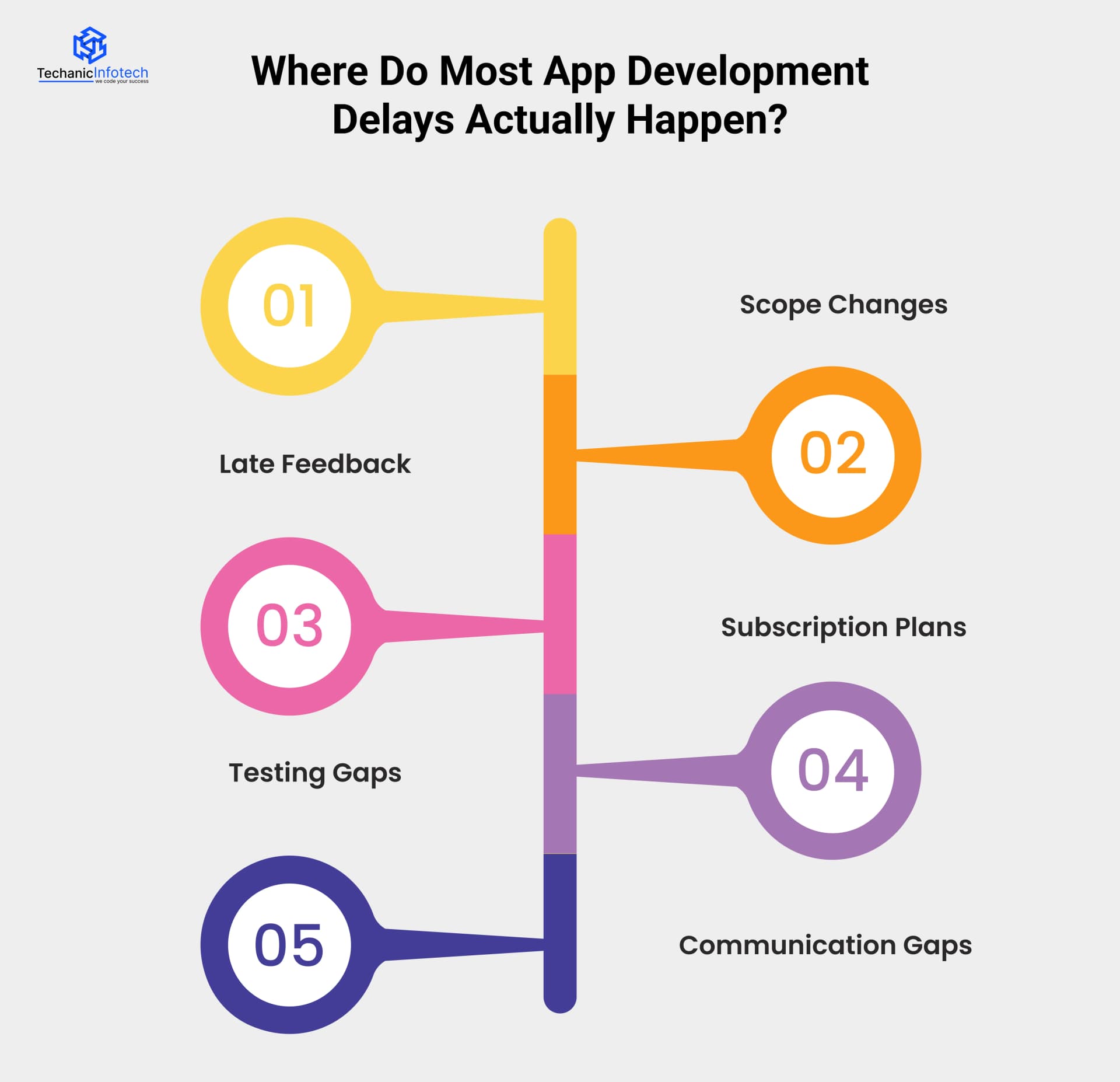
Adding new features or changing requirements during development is one of the biggest causes of delays. Even small changes can impact design, development, and testing, pushing the timeline forward and increasing overall effort.
Delays often happen when feedback from stakeholders comes too late. When reviews and approvals are postponed, teams may move ahead with assumptions, leading to rework once feedback finally arrives.
Third-party integrations such as payment gateways, APIs, or external systems can take longer than expected. Dependency on external platforms or unclear documentation often leads to unexpected delays.
Insufficient or delayed testing causes bugs to surface late in the project. Fixing issues at the end takes more time and may affect multiple parts of the app, extending the timeline.
Poor communication between teams, stakeholders, or vendors can slow decision-making and cause misunderstandings. Clear and regular communication is essential to keep development moving on schedule.
Speed matters in mobile app development, but rushing without a plan often leads to poor performance and costly fixes later. The key is to make development smarter, not careless.
Below are practical ways to speed up the mobile app development timeline while maintaining quality.
One of the fastest ways to move quicker is to focus on a Minimum Viable Product (MVP). Instead of building everything at once, identify the core features that solve the main user problem. This reduces development time, limits complexity, and allows faster testing with real users.
Frequent changes slow projects down. Spending enough time on requirement analysis early helps avoid rework later. When the scope is clearly defined, teams can move faster without stopping to revisit earlier decisions.
Agile development helps teams work in small, manageable sprints. Features are built, tested, and reviewed quickly, which keeps momentum high. This approach also allows early releases instead of waiting months for a final version.
Using cross-platform frameworks allows teams to build one codebase for multiple platforms. This significantly reduces development time compared to building separate native apps, especially for feature-rich applications.
Instead of building everything from scratch, using reusable components, templates, and trusted third-party tools speeds up development. This approach saves time without affecting quality.
Testing during development helps catch issues early. Fixing bugs in early stages is faster and cheaper than resolving them at the end. Continuous testing keeps the app stable and reduces launch delays.
Quick approvals and clear communication prevent unnecessary pauses. Regular updates and structured feedback help teams move forward without waiting.
At Techanic Infotech, managing mobile app development timelines starts with clear planning and honest communication. We break projects into well-defined phases, set realistic milestones, and follow an agile, sprint-based approach to keep progress consistent.
Our mobile app development company works in parallel on design, development, and testing to reduce idle time without compromising quality. Regular updates, early feedback cycles, and continuous testing help us catch issues before they cause delays.
By focusing on clarity, flexibility, and execution, we ensure apps are delivered on time and ready for real-world use.
Understanding the mobile app development timeline helps businesses plan better, avoid delays, and make smarter decisions from the very beginning.
From idea validation and design to development, testing, and launch, each stage plays a critical role in determining how long the project will take. While timelines vary based on app complexity, features, and platforms, having a structured roadmap keeps everything on track.
By choosing the right development approach, reducing unnecessary changes, and working with an experienced development partner, businesses can speed up delivery without compromising quality. A well-planned timeline not only saves time and cost but also ensures a smoother launch and long-term app success.
Most mobile apps take 3 to 9 months to design, develop, test, and launch. The exact timeline depends on app complexity, features, and platform choice.
Most mobile apps take 3 to 9 months to design, develop, test, and launch. The exact timeline depends on app complexity, features, and platform choice.
Key factors include app complexity, number of features, platform (Android, iOS, or both), third-party integrations, testing requirements, and development methodology.
Key factors include app complexity, number of features, platform (Android, iOS, or both), third-party integrations, testing requirements, and development methodology.
Yes. Native development for both platforms usually increases the timeline because each platform requires separate development and testing. Cross-platform development can reduce this time
Yes. Native development for both platforms usually increases the timeline because each platform requires separate development and testing. Cross-platform development can reduce this time
Yes. Using an MVP approach, agile development, early testing, and clear requirements can significantly reduce development time while maintaining quality.
Yes. Using an MVP approach, agile development, early testing, and clear requirements can significantly reduce development time while maintaining quality.
Agile development is generally faster because it uses short sprints, allows early releases, and adapts easily to changes, unlike traditional fixed planning methods.
Agile development is generally faster because it uses short sprints, allows early releases, and adapts easily to changes, unlike traditional fixed planning methods.
Common causes include scope changes, late feedback, integration issues, insufficient testing, and communication gaps.
Common causes include scope changes, late feedback, integration issues, insufficient testing, and communication gaps.
Proper planning helps avoid delays, control costs, manage resources effectively, and ensure a smoother app launch.
Proper planning helps avoid delays, control costs, manage resources effectively, and ensure a smoother app launch.


Bharat Sharma is the CTO of Techanic Infotech, bringing deep technical expertise in software architecture, mobile app development, and scalable system design. He leads the engineering team with a strong focus on innovation, performance, and security.