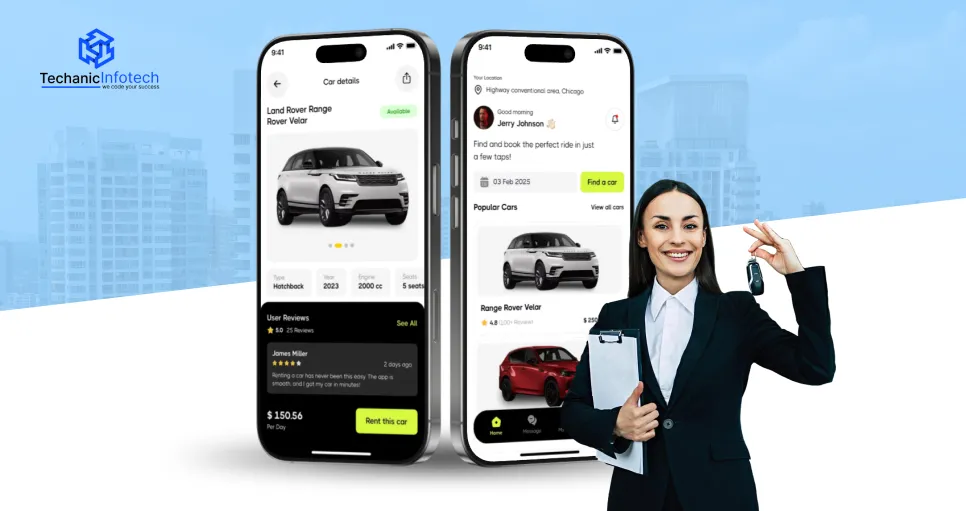
Designing a successful car rental app goes far beyond good looks. Today’s users expect fast searches, transparent pricing, and a smooth booking experience from the first tap to final confirmation.
That’s where smart UX and UI decisions shapea strong car rental app design.
A well-planned interface helps users find the right vehicle quickly, builds trust through clarity, and removes friction at every stage of the booking journey.
This car rental app design guide breaks down proven UX and UI best practices, along with essential features that directly impact conversions.
From intuitive navigation and clean layouts to booking-focused functionality, you’ll learn how thoughtful design choices turn casual visitors into confirmed renters.
Whether you’re launching a new product, a conversion-driven car rental app, or designing strategies that boost bookings and long-term user retention.
UI/UX plays a critical role in how users interact with a car rental app, making car rental app UI/UX design essential for success.
Renters want quick access to vehicles, clear pricing, and a smooth booking flow without confusion.
Strong UI creates a clean, visually appealing interface that builds trust from the first screen. Effective UX ensures users can search, compare, and book cars with minimal effort.
When the design feels intuitive, users stay longer and feel confident completing their reservations.
Poor UI/UX, on the other hand, leads to frustration, drop-offs, and abandoned bookings.
In a competitive market, thoughtful car rental app UI/UX design helps apps stand out and deliver reliable, user-friendly experiences that customers return to.
UI/UX directly affects how users interact with a car rental app and whether they complete a booking.
A smooth, intuitive experience helps users move quickly from search to checkout while reducing confusion and frustration.
Clean layouts, clear pricing, and simple navigation build trust and improve decision-making. When the app feels easy to use, users stay engaged and are more likely to return.
Higher booking conversion rates
Reduced cart abandonment
Faster user navigation
Improved customer trust
Better user retention
Discover the best UI/UX practices for car rental app design and learn how to design a car rental app that delivers smooth navigation, clear pricing, and a booking experience users trust.
Strong user experience is essential for smooth bookings and customer satisfaction. UX design for car rental apps focuses on simplifying navigation, reducing friction, and guiding users through search, selection, and checkout with clarity, speed, and confidence.
When you design a car rental app, the user journey should feel effortless from search to checkout. Clear navigation, logical screen flow, and minimal distractions help users move confidently through the app and complete bookings without unnecessary friction or confusion.
Improving the car rental app user experience means removing barriers that slow users down. Short forms, guest checkout options, and auto-filled details make booking faster and more convenient, especially for users renting cars on the go or under time pressure.
A user-centric car rental app design focuses on helping users find the right vehicle quickly. Smart filters for price, location, car type, and dates allow easy comparisons, reduce decision fatigue, and increase the chances of users completing their reservations.
Real-time feedback keeps users informed at every step. Availability updates, loading indicators, and instant confirmations reduce uncertainty and build confidence, ensuring users stay engaged instead of abandoning the app during key actions.
Understanding how to develop a car rental app includes planning for user errors before they happen. Clear instructions, inline validations, and helpful error messages prevent mistakes during booking and payment, creating a smoother, more reliable user experience.
Visual clarity and consistency play a major role in user trust and engagement. UI best practices for car rental apps focus on clean layouts, strong visual hierarchy, and clear CTAs that help users understand options quickly and book with confidence.
A well-structured car rental app design relies on clean layouts, consistent colors, fonts, and spacing. Visual consistency improves readability, reduces confusion, and helps users navigate the app confidently, creating a polished and trustworthy experience.
When you design a car rental app, key actions like “Search Cars” or “Book Now” should stand out instantly. Clear buttons, strong contrast, and proper spacing guide users smoothly toward the next step without hesitation.
Effective car rental app interface design uses size, contrast, and spacing to guide attention. Highlighting prices, car details, and CTAs helps users scan information quickly and make faster booking decisions.
Readable fonts, proper color contrast, and touch-friendly buttons ensure the app works well across devices and user abilities. Accessible UI improves usability, engagement, and overall satisfaction for a wider audience.
A conversion-focused car rental app UI uses high-quality vehicle images, intuitive icons, and clear CTAs to encourage action. These elements build trust, reduce hesitation, and guide users toward completing bookings.
A successful car rental app combines convenience, transparency, and speed. The top car rental app features help users find vehicles quickly, trust pricing, and complete bookings without friction. These features play a key role in improving user experience and driving consistent bookings.
A powerful search feature allows users to find the right car based on location, pickup date, drop-off date, price range, and vehicle type.
Advanced filters save time and reduce frustration by narrowing down options instantly. When users can compare vehicles easily, they make faster decisions and are more likely to complete bookings.
Real-time availability ensures users only see cars they can actually book. Following car rental app UX UI best practices, this feature prevents double bookings, outdated listings, and last-minute cancellations.
Accurate availability builds trust and creates a reliable booking experience that encourages repeat usage.
Clear pricing is essential for booking-focused car rental app design. Users should see base rental costs, taxes, insurance, and additional fees upfront.
Transparent pricing removes uncertainty, builds trust, and reduces checkout abandonment by helping users feel confident about their final payment.
A streamlined booking flow is a core part of effective car rental app design. Fewer steps, minimal form fields, and guest checkout options make reservations easier.
A smooth checkout experience is especially important for mobile users and helps improve overall conversion rates.
Understanding how to design a car rental app includes offering flexible and secure payment methods.
Supporting credit cards, digital wallets, and in-app payments with strong encryption builds user confidence and ensures safe transactions throughout the booking process.
In-app notifications keep users informed at every stage of their rental journey. Booking confirmations, pickup reminders, payment updates, and return alerts improve communication, reduce confusion, and help users feel in control of their reservations.
User profiles allow customers to save personal details, preferences, and past bookings. This feature makes repeat rentals faster and more convenient while giving users easy access to manage reservations, rebook vehicles, and track payments efficiently.
Ratings and reviews help users make informed decisions and trust the platform. Integrated customer support options, such as chat or call assistance, provide quick issue resolution and ensure users feel supported throughout the rental process.
This mobile app design guide highlights common car rental app mistakes and practical ways to avoid them, helping teams create smoother user experiences, reduce drop-offs, and build booking-friendly apps that users trust.
Poor car rental app UI/UX design often includes unnecessary steps, long forms, or confusing checkout screens. Simplifying the booking flow helps users move faster, reduces frustration, and increases the likelihood of completing reservations.
A user-centric car rental app design always shows rental costs, taxes, insurance, and add-ons upfront. Transparent pricing builds trust, prevents surprises, and encourages users to confidently finish the booking process.
Knowing how to design a car rental app means avoiding overcrowded screens and unclear menus. Clean layouts, clear labels, and logical navigation help users find cars easily and move through the app without confusion.
Slow load times, laggy interactions, and unresponsive elements frustrate mobile users. Optimizing performance ensures smoother navigation, better engagement, and fewer abandoned sessions during browsing or checkout.
Launching without testing increases usability issues. Regular testing and real user feedback help uncover design flaws, improve functionality, and ensure the app continues to meet user expectations over time.
As user expectations evolve, car rental apps must adapt with smarter, faster, and more personalized experiences.
Future-focused UX and UI design will prioritize automation, trust, and convenience while balancing innovation with usability and car rental app development cost efficiency.
AI-Powered Personalization: Apps will use AI to suggest vehicles, locations, and pricing based on user behavior, improving booking speed and relevance.
Voice and Chat-Based Interfaces: Voice search and in-app chat assistants will simplify searches, reservations, and support, creating hands-free and faster interactions.
Minimalist and Conversion-Driven UI: Cleaner layouts with fewer distractions will guide users toward faster bookings and better decision-making.
Real-Time Data and Smart Pricing Displays: Dynamic pricing, live availability, and instant updates will increase transparency and user trust.
Cost-Efficient Design and Scalable UX: Scalable design systems will help businesses manage updates and features without sharply increasing car rental app development.
Discover the ultimate resources to build a sleek, user-friendly, and high-performing car rental platform with Techanic Infotech’s car rental app design guide.
As a leading car rental app development company, Techanic Infotech combines innovative UI/UX strategies with cutting-edge technology to help businesses elevate their digital presence.
This comprehensive guide walks you through essential design principles, user flow optimization, and feature-rich interfaces tailored for modern rental services.
Whether you’re a startup or an established enterprise, Techanic Infotech ensures your app stands out with intuitive navigation, stunning visuals, and seamless functionality.
Unlock the blueprint for creating a powerful rental solution and start your journey toward building a truly impactful car rental application.
A successful car rental app depends on more than just functionality; it relies on thoughtful car rental app design that puts users first.
By focusing on strong UX, clean UI, and booking-focused features, businesses can create apps that feel intuitive, fast, and trustworthy.
From simplifying navigation and ensuring transparent pricing to optimizing performance and embracing future trends, every design choice impacts user satisfaction and conversions.
Avoiding common design mistakes and following proven best practices helps reduce drop-offs and improve retention.
As competition continues to grow, investing in user-centric design becomes essential for long-term success.
A well-executed car rental app design not only increases bookings but also builds brand loyalty, encourages repeat usage, and delivers consistent value for both users and businesses.
UI/UX improves usability, builds trust, and simplifies bookings. A smooth experience helps users find cars faster, reduces drop-offs, and increases completed reservations.
Key features include advanced search filters, real-time availability, transparent pricing, secure payments, booking history, notifications, and customer support for a seamless rental experience.
Good car rental app design reduces friction, improves navigation, and builds confidence during checkout, which directly increases conversions and encourages users to complete bookings.
Common mistakes include cluttered interfaces, hidden fees, complex booking flows, slow performance, and ignoring user feedback, all of which lead to higher abandonment rates.
Businesses can improve apps by optimizing UX flows, updating UI elements, adding booking-focused features, improving performance, and testing regularly based on real user behavior.


Abhishek Jangid is the CEO of Techanic Infotech, with extensive experience in mobile app and web development. He specializes in helping businesses turn innovative ideas into scalable digital solutions through strategic planning and modern technology.