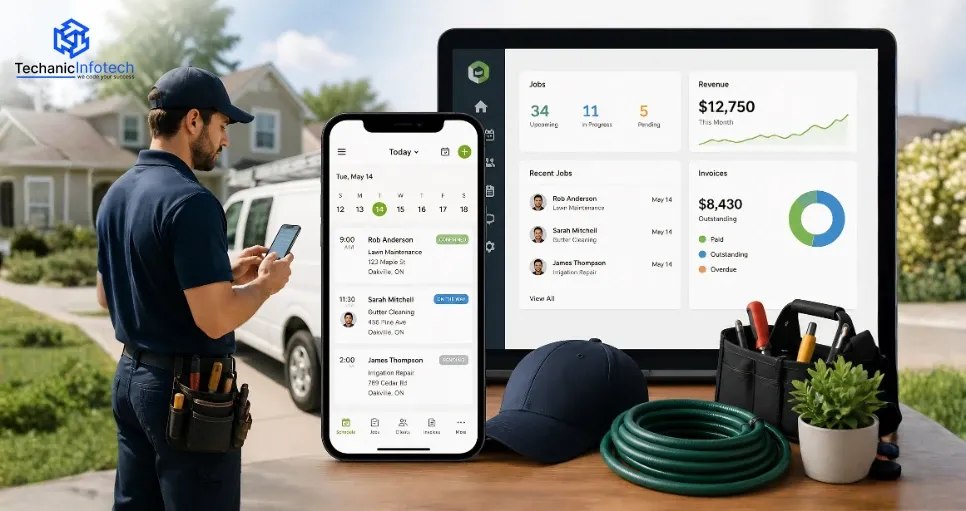
If you have ever run a service-based business (plumbing, cleaning, landscaping, HVAC, etc.), you’re familiar with the operational tasks that come along with the actual work.
The hardest parts are usually not the field service tasks themselves, but rather the time around the job: the scheduling, invoicing, customer follow-ups, getting paid, managing your people, etc.
Apps like Jobber exist specifically to solve these problems.
What if you could build your own version?
Startup founders, entrepreneurs, agencies, you name it if you have a focus on creating a business-to-business SaaS solution, now is a good time to build an app like Jobber for your own local market or vertical.
The current demand for digital home services makes investing in home service app development a no-brainer.
This blog is going to cover all the important details: the features of Jobber, why replicating it makes sense, the steps for developing your own Jobber-style app, important features to include, development costs, and proven monetization strategies.
So, let’s get started.
Jobber is a cloud-based SaaS platform built to optimize the operation of home service businesses.
The app is useful for B2B operations in the SMB market. Jobber itself is mobile-friendly, and the people using it are highly likely to be mobile users.
Jobber has one of the highest customer satisfaction ratings in the field service market (currently at 9.7/10).
If you are considering building an app like Jobber, keep in mind that the core value you want to provide is convenience, automation, and real-time coordination.
It is one of the smartest ways to get into the home service app development market, as the digital transformation is a requirement rather than a competitive advantage.
Let’s get to know those features that are necessary to make an app like Jobber.
Must-Have App Features Like Jobber (+FREE Bonus!)
Alright, so you’ve decided to build an app like Jobber.
Congratulations! That’s a super smart idea.
Now the tricky part: What features do I include in my app?
Hopefully, this will help.
In a fun, simple, and bullet-pointed way, here are 14 “don’t-even-think-about-launching-without” app features that every app builder should consider.
The most important and fundamental feature of any service industry app.
Your app must make scheduling jobs as easy as possible for users create jobs, schedule them to employees, view them on a calendar or map view, send SMS/email reminders to teams and clients, etc.
The scheduling features should be robust and dynamic drag and drop features, color-coded status updates, and real-time updates for busy teams on the go.
Time is money in most service jobs. The ability to track employee locations in real-time can be a real saver.
Include live GPS tracking on mobile so admins can easily see their team’s location on a map and assign them last-minute jobs in their area or track how long a job might take in order to send an ETA to a customer. Trust and transparency go hand in hand.
Every field service and cleaning company knows how long it can take to prepare quotes and invoices in Microsoft Word. Now imagine a tool that creates professional-looking quotes and invoices in seconds and sends them to clients directly from their phone.
Give your users the ability to customize quote/invoice templates, apply taxes, add line-item detail, get digital signatures, accept in-app payments, and even accept online payments via credit card, Stripe, PayPal, or direct deposit.
Nobody likes to wait for clients to pay them.
Add features to accept online credit cards or direct bank deposits right from your app. Include options to scan a card on-site or even plug a card reader into an employee’s mobile device for even faster payments. Make getting paid easy and effortless for your users.
Knowing your customers is half the battle for any small business.
Your users will want to know what services a customer received in the past, their contact details, any notes, and even their preferences.
Include a simple CRM system that allows your users to store and attach client history (jobs), contact info, notes, photos/files, and even track communications for added value.
We’ve all forgotten something in the past.
Jobs often have specific tasks that should be followed. Give your users the ability to create job checklists that can be assigned and completed for every new job. “Turn off the main valve” or “Take before/after photos” will be different for every field service.
Proof is in the photos.
Many services cleaning, landscaping, maintenance, painting, repair, remodeling, moving, etc. rely on visual confirmation of services rendered.
Allow users to snap, upload, and catalog photos directly in the mobile app within a specific job file. Bonus if your app also allows photo tagging, markup tools, or even before/after photo comparisons.
Don’t let your users forget!
SMS or email automated reminders for new jobs, recurring jobs, unpaid invoices, payment due dates, review requests, and other tasks are a feature your users will need.
Schedule automations to take care of the easy stuff so your users never have to worry about them again.
Your app won’t be the only software in your user’s toolbox.
Allow integrations for popular third-party tools like Google Calendar, Microsoft Outlook, Xero, and QuickBooks to sync data both ways. Save your users the pain of having to enter duplicate data.
Sometimes jobs take your users out of the city.
Jobs with limited cellular reception are common, so your app should account for it.
Ensure your app has offline capabilities for common tasks and make it easy to save local data like job details, job notes, images, and even inspection forms to be synced once an internet connection is available.
This is where the numbers come to life.
Your users need a way to check at a glance how their business is doing in a way that’s simple, easy to read, and visually engaging.
Give your users the option to view metrics like earnings, outstanding invoices, or completed jobs, as well as top clients, top-performing team members, etc. All in one dashboard. Insight can do wonders for business growth.
Not everyone on your user’s team needs access to everything in the app.
Build role and permission options so admins can control exactly what team members can see schedules, access to view customer data, invoices, etc.
Customized permissions per role can also keep your app interface simple and customized to each user’s needs.
Give customers the power to book on demand.
Add a simple feature that lets your users create a branded online booking widget or lead form that can be embedded on their website or social media pages. Your users can capture 24/7 leads even while they’re sleeping.
Last but not least, make sure your app is actually easy to use.
This is a given, but one that many app creators forget.
Build a clean, clutter-free app with engaging icons, swipe actions, tooltips, and speed for an intuitive and magical feel that your users will be happy using every day.
Get more details, including videos, on all of the features listed in this post over in our article How to Build a Job Dispatching App for Field Service (Bonus: Download a Free Feature Checklist)
As soon as we got an idea of the features, it was time to know how to develop them, which is what our next section is all about.
Are you considering turning your home service business idea into reality with an intelligent field management app?
If you want to reach home service professionals, contractors, and other mobile teams, building an app like Jobber is a great way to get ahead of the competition.
Jobber is popular among users for its sleek UI, automation features, and ease of use, so if you’re looking to build an app like Jobber, you'd better start with the right plan.
Here’s how to go about it, step by step.
Before you start sketching UIs or writing code, first and foremost, you need to define who your app will be serving.
Is it individual cleaners? Small to mid-sized landscaping crews? Commercial HVAC companies with dispatchers and crews?
The more you know about your users’ existing workflows, pain points, and objectives, the more intuitive your app will be. This knowledge will be critical in the early stages to build an app like Jobber that is not just useful but valuable.
If you want to make an app like Jobber, the app must streamline end-users’ day-to-day workflows.
Job scheduling and dispatching, customer management (CRM), quoting and invoicing, online payments, GPS tracking, photo uploads, automated reminders, calendar integrations, business analytics, etc.
These features are a good start, but don’t overthink it at this stage create the list and go through it with your potential users to understand their top priorities.
You don’t need to build everything on day one, but at least make sure you have it on the roadmap.
Next, define the user journeys that will allow app users to get from point A to point B with ease.
As Jobber users expect, and the app is used across all devices, the most common flows include:
User onboarding
Customers booking services
Contractors accepting and dispatching jobs
Contractors performing jobs and taking photos
Customers and contractors are being notified of progress
Contractors getting paid
When creating an app like Jobber, you want to make sure your user experience (UX) is as seamless as possible fluid, frictionless, and mobile-first. Wireframes will help you define the screen layouts before your designers get creative.
The next step is bringing visual magic to those wireframes.
Design a clean, friendly UI that looks and feels modern, intuitive, and usable. Icons, labels, colors all elements should lead the user to the logical next step naturally.
If you’re looking to build an app like Jobber that has happy users, it’s important to keep a clean layout and avoid visual clutter. Prioritize mobile-first usability (especially on smartphones and tablets) and make it dead simple for people to use on the go.
Pro tip: run user tests during this phase to collect feedback and iterate before development.
This is the foundation of your entire app-building endeavor, so you’d better choose wisely.
If you’re building an app like Jobber, you want a tech stack that supports features like real-time syncing, offline access, push notifications, secure payment processing, and native-like performance across iOS, Android, and web.
Popular stacks include React Native or Flutter for mobile, and Node.js or Django for the backend. AWS and Firebase are good cloud platforms to consider for storage, hosting, and database.
An app like Jobber didn’t start that way, so you shouldn’t either.
Resist the temptation to create every feature you can think of for the initial launch.
Focus instead on the core MVP features that will solve the most critical user problems. If you’re looking to create an app like Jobber, you should focus on the basics: job scheduling and dispatching, invoicing, basic CRM, and online payment processing.
Launch quickly, then iterate based on feedback. The sooner you go live, the sooner you can get valuable, real-world user insights.
If you’re set on building an app like Jobber, it must feel rock-solid and professional from day one.
So, before you release the app to the world, make sure to test with a few real contractors who will use the app to manage their day-to-day business.
Have them test the key user flows and observe. Take notes on any bugs, user errors, and feature requests. Make the necessary fixes and polish until your beta testers give the app a green light.
Congratulations, you’re done! Go ahead and release the app.
But wait just because you’re live doesn’t mean your job is done. To build an app like Jobber that scales and wins the market, treat launch as only the first phase.
Once the app is out in the wild, pay close attention to its performance and how people are using it. Watch for patterns in the app store reviews and aggregate feature requests and improvement ideas. Then roll out fixes, updates, and new features in subsequent updates.
You might also consider adding marketing features like referral programs, email marketing integrations, and lead capture forms.
Jobber, the company, didn’t stop improving their app after it first launched. And neither should you.
Keep evolving your product, adding new features, and looking for ways to make life easier for end-users. You could add team permissions, route optimization, advanced business analytics, and integrations with QuickBooks, Google Calendar, and other service-based tools.
To develop an app like Jobber that competes in the market, you should keep up with demand requires continuous, user-focused product evolution.
Okay, let’s talk numbers. So, how much does it cost to build an app like Jobber?
Well, it depends on a lot of factors. The average cost to develop an app like Jobber is between $20,000- $50,000+.
For a basic MVP, it’s going to be at the lower end. A full-featured, cross-platform app with all the bells and whistles on both iOS and Android will be higher.
The average cost also depends on your location and what technologies you use to build it.
The short answer? The is a cost to build a home service app investment. But it’s an investment that can seriously pay off.
OK, let’s be honest: developing an app like Jobber isn’t all sunshine and rainbows.
It’s an exciting (and lucrative) idea, but crafting a slick, feature-packed solution like Jobber to do the hard work of helping you build a home services business is full of potential gotchas.
If you’re looking to build a home services app like Jobber, here are five challenges you may face while developing a home service app , so you can sidestep them with ninja-like expertise.
Users want all the bells and whistles: job scheduling, GPS tracking, integrated invoicing, you name it.
The challenge? Providing those features in an elegant, user-friendly way.
If you want to build a home service app like Jobber, you’ll need to design a clean UI that is highly functional (without being intimidating or complex).
Picture this: a field tech updates a job on the mobile app, but the office team doesn’t see the changes in real-time. Major fail.
You have to ensure updates between the desktop dashboard, mobile app, and admin portal happen in real-time. This requires some heavy-duty back-end work, so if you’re planning on developing an app like Jobber, make sure your tech stack and infrastructure can support it.
You’ll have all kinds of sensitive info: client data, invoices, payment processing, and more.
You’ll need to make sure you have airtight logins and security, encrypted transactions, and (depending on your use case) compliance with security and privacy standards (PCI, GDPR, etc. ).
If you want your app to be taken seriously, security needs to be top of mind from day 1.
If you’re going to build a home service app like Jobber that’s actually functional and useful, you need to understand the day-to-day realities of the customer’s workflow down to a tee.
How does a landscaper’s Tuesday go? What’s the invoicing process for an HVAC tech? What makes cleaning crews throw their hands up?
If your app doesn’t understand how things are done on the front lines, it won’t make inroads, no matter how aesthetically pleasing the interface is.
Your MVP might run smoothly with 10 users.
Can it handle 10,000? When you build a home service app like Jobber, you need to be ready to scale quickly and gracefully and that means anticipating a whole slew of things like load handling, server upgrades, caching, etc.
To learn more about building an app like Jobber or use Jobber’s very own builder instead reach out to us today and let’s talk!
We’d love to help you build the app that works best for your specific use case.
Now that you know the challenges involved in building a Jobber-style app, let’s talk about the fun part: how apps like Jobber actually make money.
If you want to build a home service app like Jobber, you need to know how the business model works and exactly how it generates revenue. You’ll need that in the background to build a profitable business, not just a shiny app.
Jobber makes money through several revenue streams, and we’re here to break it all down for you:
The core revenue stream.
Jobber charges a monthly or annual subscription fee for users to access various tiers of features. The more users, advanced tools, and integrations, the higher the plan.
If you build a home service app like Jobber, you’ll offer flexible pricing, for example, starter, pro, and premium plans for small teams, growing companies, and enterprise clients.
Love the recurring revenue model? We do too.
Need text message reminders? Want more storage? Need access to priority support?
Jobber monetizes by offering these and other features as premium add-ons.
When you build a home service app like Jobber, think about all the optional features your users would happily pay more for. It’s the little things that add up and form a revenue stream.
Here’s a neat one: Jobber integrates online payments and charges a small transaction fee for each payment made using their platform.
By facilitating in-app payments via credit card or ACH, you can create a source of passive income for your app.
Nice one.
Some platforms monetize by providing integrations with accounting tools, marketing platforms, CRMs, etc.
If you build a home service app like Jobber, you can charge for premium API access or partner features. Especially if your app becomes a part of a broader workflow.
Feel fancy?
You can license your platform to other service industry verticals and rebrand it under their logo. It’s essentially Jobber, but with their brand name and colors instead of yours.
Smart. Expand your reach and revenue without doing all the marketing work yourself.
Dreaming of a Jobber-style app that your customers will rave about? We’re Techanic Infotech, and we’re here to help.
We’re a home service app development company with a focus on building effective and easy-to-use apps aligned to your business objectives.
Are you looking for a simple MVP or an end-to-end platform, decked out with features? We have the design, development, and industry know-how to build both.
Job scheduling, payment integration, and more we’ll build the performant app you’ve envisioned.
So let’s build a winner, together.
Creating a Jobber-like app isn’t just savvy business it’s a future-proof investment in the booming home service industry.
Why Build a Jobber Clone App: Powerhouse Features, Proven Monetization
Jobber has established a benchmark for home service apps with its best-in-class features.
The roadmap to success: Launch MVP or fully-loaded? Plan wisely. The key lies in understanding your audience, prioritizing usability, and scaling with purpose.
Ready to transform your idea into a profitable app? Let’s create your Jobber-style app, faster, smarter, and better.
Developing a Jobber-like app typically takes 3 to 6 months on average to get an MVP version with essential features, platforms, and complexity considered. A fully featured version takes longer and usually comes with customizations.
The price tag of a Jobber-like app development project could range from $40,000 to $150,000. The total cost depends on the design, feature set, development location, platform, and other cost-affecting factors.
Definitely! Many startups that launch a Jobber-like app do that by releasing a Minimum Viable Product (MVP). They start with must-have features like scheduling jobs, invoicing, and customer management, and add more as they collect user feedback.
Hiring an app development company means you get to work with a team that knows about the industry, user behavior, and technical challenges you need to consider. They can help you launch faster, prevent expensive mistakes, and give you a polished, scalable app.
A Jobber-like app should include features like job scheduling, invoicing, customer management, real-time tracking, payment integration, and notifications. Advanced features like reporting and automation can be added later.
Popular technologies include Flutter or React Native for frontend, Node.js or Django for backend, and cloud services like AWS or Firebase for scalability and performance.
Yes, most Jobber-like apps include an admin web panel for managing customers, jobs, payments, and reports efficiently.
Yes, you can integrate tools like payment gateways, CRM systems, GPS tracking, and accounting software to enhance app functionality.
Yes, with the right architecture and cloud infrastructure, your app can easily scale to support more users, features, and data over time.
You can monetize through subscription plans, service fees, premium features, or commission-based models depending on your business strategy.


Bharat Sharma is the CTO of Techanic Infotech, bringing deep technical expertise in software architecture, mobile app development, and scalable system design. He leads the engineering team with a strong focus on innovation, performance, and security.