AI is revolutionizing mobile app development. Developers now leverage intelligent tools to streamline workflows, write high‑quality code faster, and create smarter applications.
From automated testing to advanced code generation and design assistance, AI tools help teams optimize productivity, reduce errors, and focus on innovation.
Whether you're a solo developer, startup founder, or enterprise team, integrating AI tools into your development lifecycle enhances both efficiency and quality.
This guide highlights key considerations, benefits, selection tips, and the top tools that can supercharge your mobile app projects in 2026 and beyond.
In terms of making the mobile applications successfully, it's crucial to consider the common things for making the AI app development process smoother without consuming more time.
Following are the list of the key things that one should consider in terms of developing the mobile application.
Choose an AI tool that fully integrates with your existing programming languages, frameworks, and infrastructure, minimizing integration issues.
It is also helpful in reducing friction and empowering your team to develop an AI therapy app by maximizing efficiency without costly adaptations or workarounds.
Select tools with a clean, user-friendly interface, well-structured workflows, and comprehensive documentation.
It is helpful for users to enable your team to onboard quickly, adopt features confidently, and maintain high productivity without unnecessary delays or training burdens.
Prioritize AI solutions that implement rigorous security protocols, encrypt sensitive data, and comply with privacy regulations.
Supportive for users in protecting user information, mitigating risks, and ensuring organizational trust and confidence in production environments.
Ensure the AI platform can efficiently scale with increasing users, data volume, and computational demands, maintaining fast, reliable performance.
It is also supportive of your application’s growth without performance bottlenecks or downtime disruptions.
Evaluate pricing models carefully, subscription, per-user, or usage-based, ensuring they fit your budget, support future growth, and avoid hidden fees, providing a predictable, efficient cost to build a Fitness App for your project and team.
Opt for AI tools backed by responsive support, comprehensive tutorials, and active developer communities, enabling rapid issue resolution, knowledge sharing, and continuous learning to enhance team efficiency and problem-solving capabilities.
Integrating AI in mobile app development enhances user experiences, personalizes interactions, optimizes performance, and automates processes, enabling smarter, faster, and more efficient applications that adapt to user needs.
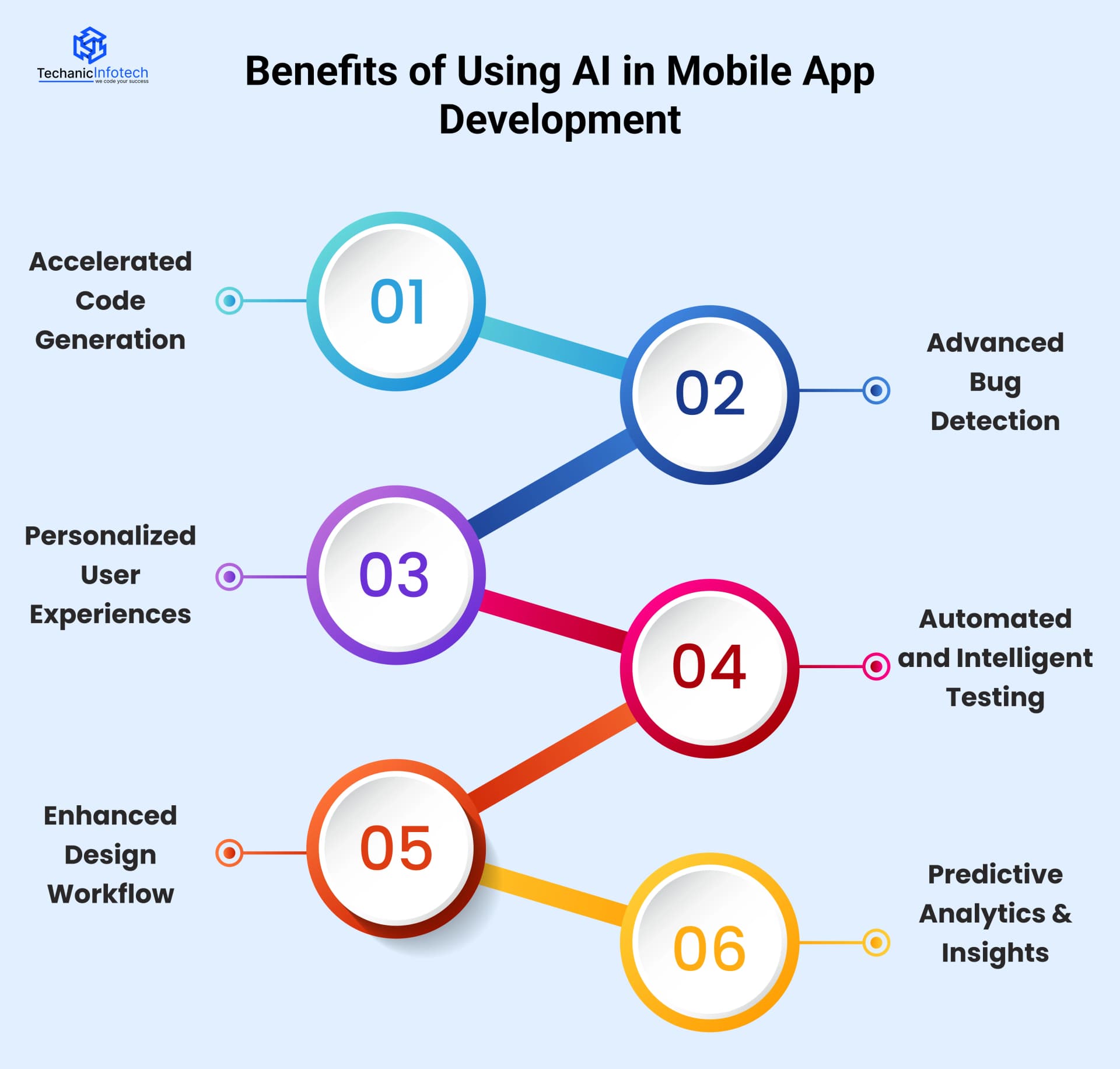
AI tools can intelligently auto-generate boilerplate code, provide context-aware suggestions, and streamline repetitive coding tasks, significantly accelerating development cycles while reducing manual effort and human errors.
AI-powered testing and code review systems detect errors early, identify potential vulnerabilities, and suggest fixes proactively, improving overall app quality while drastically reducing debugging time and post-release issues.
AI enables dynamic personalization, smart recommendations, and adaptive interfaces, creating highly tailored experiences that increase user engagement, satisfaction, and long-term retention.
Leverage AI to automate repetitive testing processes, improve test coverage, increase accuracy, and save developers hours of manual QA work, enabling faster and more reliable software releases.
AI tools can transform sketches or wireframes into polished UI designs, enabling designers to iterate faster, bridge gaps between concepts and prototypes, and accelerate the entire design-to-development process.
Harness AI to analyze user behavior, detect patterns, and forecast trends, empowering teams to make informed, data-driven decisions that optimize product performance, engagement, and business outcomes.
Choosing the right AI tool for your app ensures optimal performance, seamless integration, and enhanced user experience by aligning technology capabilities with your app’s goals, MVP cost to launch an app, and development requirements.
The following are the ways to choose the right AI tool for developing a mobile application successfully.
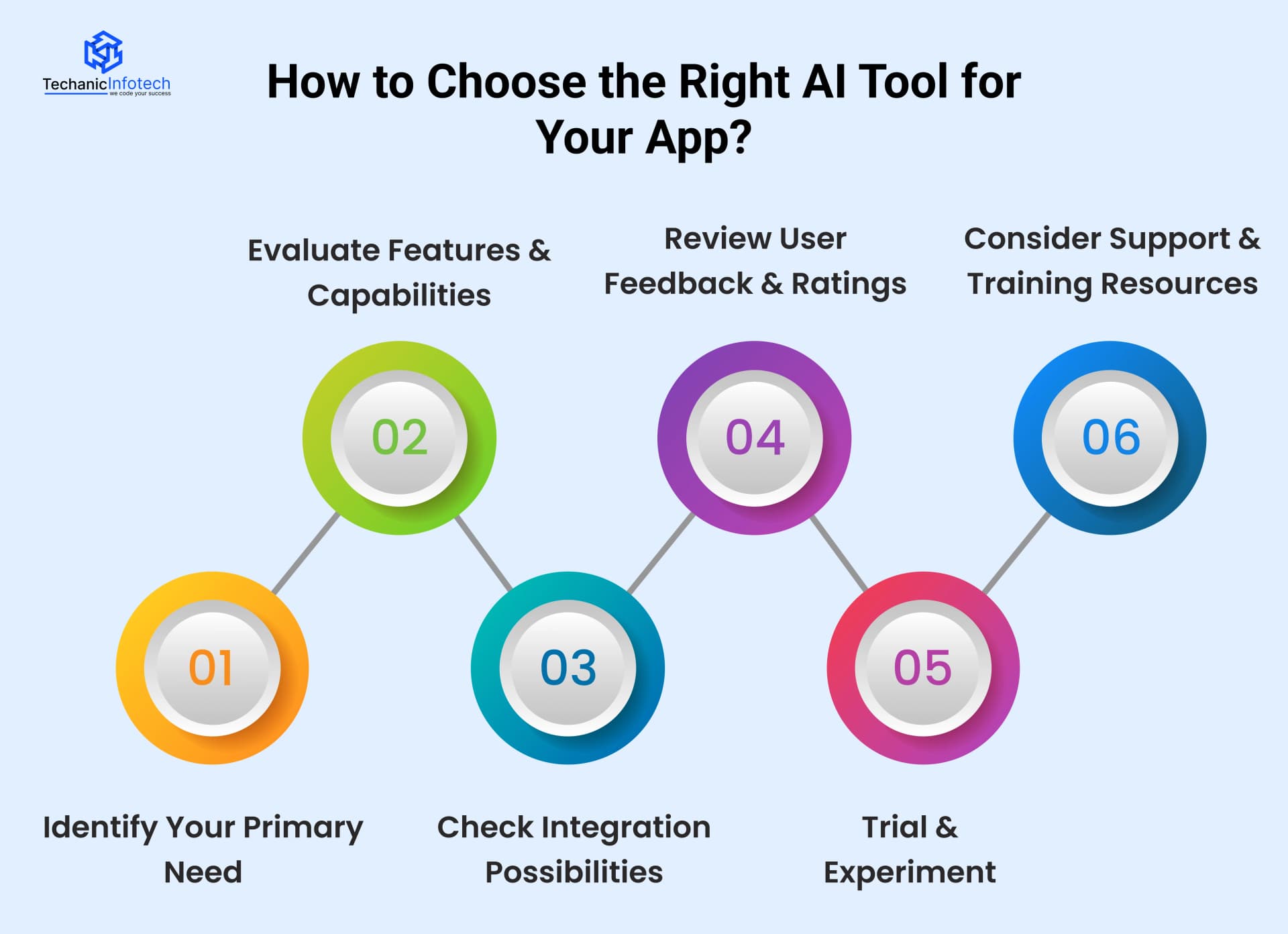
Precisely define your team’s most critical requirements—coding, testing, design, analytics, or deployment so you can select an AI tool that directly addresses your highest-value challenges and maximizes development efficiency.
Conduct a detailed assessment of each tool’s features against your project objectives, ensuring it solves core pain points, enhances workflows, and delivers tangible productivity gains rather than superficial or redundant functionality.
Prioritize AI tools that seamlessly integrate with your IDE, version control systems, CI/CD pipelines, and existing workflows, preventing operational friction and enabling smooth, uninterrupted adoption across your development ecosystem.
Examine developer reviews, testimonials, and case studies to uncover real-world performance, potential limitations, and reliability insights, providing a realistic understanding of how the tool functions under practical conditions.
Run small-scale pilots or proof-of-concept projects to validate each tool’s capabilities and uncover hidden challenges.
It is also helpful in ensuring about meeting your performance expectations before committing to organization-wide implementation.
Select AI tools with comprehensive documentation, step-by-step tutorials, responsive customer support, and active community engagement to accelerate onboarding, enhance team competency, and ensure continuous operational success.
Exploring the right AI tools can transform mobile app development, boosting efficiency, personalization, and innovation.
Here’s a curated list of 15+ powerful AI tools that simplify and enhance app creation.
Cursor is an advanced AI-driven coding assistant that integrates seamlessly with popular code editors.
It intelligently predicts and autocompletes code, generates entire functions, identifies errors, and offers context-sensitive suggestions, significantly accelerating software development and reducing repetitive coding tasks.
Developed collaboratively by GitHub and OpenAI, Copilot transforms natural language prompts into functional, production-ready code.
It provides intelligent code completions, boilerplate generation, and entire function suggestions, empowering dedicated developers vs In-House team to prototype faster, reduce errors, and focus on higher-level logic.
Google’s Gemini Code Assist is a sophisticated AI tool designed to enhance developer productivity.
It delivers context-aware code completions, offers explanations for complex logic, and provides debugging recommendations, making it ideal for streamlining development workflows across multiple languages and frameworks.
Windsurf is a cutting-edge platform for AI-assisted data science and machine learning.
It simplifies model building, automates data exploration, and accelerates predictive analytics workflows, allowing data scientists to focus on insights and experimentation rather than repetitive coding tasks.
Cline is an AI-powered collaborative coding assistant that emphasizes team efficiency. It provides real-time code suggestions, detects potential errors, and offers intelligent autocompletion.
It is also helpful in enhancing collaboration, maintaining coding consistency, and improving overall software development speed.
Amazon Q Developer is Amazon’s AI-driven coding assistant tailored for cloud-native development.
It supports automatic code generation, debugging, and optimization, particularly for applications using AWS services, enabling developers to build scalable, reliable cloud infrastructure efficiently.
Developed by Anthropic, Claude Code is a reliable AI coding assistant that prioritizes safe, context-aware code generation.
It provides intelligent completions, thorough explanations, and debugging support, helping developers maintain high-quality code while accelerating development cycles.
Tabnine is a powerful AI code completion platform that integrates with all major IDEs. It predicts code snippets and entire blocks in real-time, supports multiple programming languages.
Not only this, but it also reduces repetitive boilerplate coding, significantly improving developer efficiency and workflow speed.
Cody is an AI assistant embedded within Sourcegraph, designed to help developers understand, navigate, and generate code across large repositories.
It enhances productivity by improving code comprehension, accelerating onboarding, and providing context-aware suggestions during collaborative development.
Replit Agent is an intelligent AI assistant built into the Replit online IDE. It supports real-time code generation, debugging, optimization, and problem-solving.
It is also helpful in enabling both beginner and advanced developers to collaborate seamlessly and accelerate project completion directly in the browser.
Google ML Kit is a mobile SDK offering pre-trained machine learning models for Android and iOS apps.
It enables developers to integrate powerful AI features like image labeling, text recognition, barcode scanning, and face detection without requiring extensive ML expertise.
TensorFlow, developed by Google, is an open-source machine learning and deep learning framework widely used for building and deploying neural networks.
It supports scalable ML workflows, research experimentation, production-ready applications, and edge device deployment for both small and large-scale projects.
OpenCV is a leading open-source computer vision library that enables developers to perform advanced image and video processing.
It supports object detection, facial recognition, motion tracking, and augmented reality, with applications in robotics, AI, and real-time video analytics across multiple platforms.
Uizard is an AI-powered UX/UI design platform that converts rough sketches, wireframes, or text descriptions into polished, editable digital prototypes.
It accelerates app and web design, reduces manual effort, and enables designers and developers to rapidly iterate on user interfaces.
PyTorch, developed by Meta, is a dynamic deep learning framework designed for both research and production.
It supports neural networks, computer vision, natural language processing, and reinforcement learning, providing an intuitive interface for building complex models with flexible computation graphs.
Visily is an AI-assisted, no-code UX/UI design tool that transforms rough sketches, ideas, or textual requirements into fully realized wireframes and interactive app prototypes.
It streamlines design workflows, enhances collaboration, and empowers designers and non-technical users to create functional interfaces quickly.
AI tools are transforming mobile app development by making coding, testing, design, and deployment faster, smarter, and more efficient.
They empower developers to focus on creativity and innovation while automating repetitive tasks, reducing errors, and optimizing workflows.
With AI, apps can deliver personalized user experiences, predictive analytics, and intelligent features that enhance engagement and retention.
Integrating AI into your development process is no longer optional—it’s essential for building successful, future-ready mobile applications.
AI tools use machine learning and automation to assist coding, testing, design, and analytics, improving speed and quality throughout development cycles.x
AI augments developers by accelerating tasks, not replacing creativity and strategic problem‑solving that humans provide.
Security depends on best practices and testing; AI helps, but developers must validate and secure code before deployment.
Most support popular languages like JavaScript, Python, Swift, and Kotlin, but compatibility varies among tools.
Pricing differs by tool; many offer free tiers or affordable plans suitable for individual developers and startups.


Bharat Sharma is the CTO of Techanic Infotech, bringing deep technical expertise in software architecture, mobile app development, and scalable system design. He leads the engineering team with a strong focus on innovation, performance, and security.